
How to Write an Invoice in 2026 (+ Free Invoice Templates)
An invoice is a document you send a client or customer to request payment for products or services, listing what they owe, when it's due, and how to pay. Writing one takes 10 minutes once you know the structure. Below is the exact skeleton to follow, plus what changes depending on which country you're invoicing from.
How to Write an Invoice on Paper
If you're writing an invoice by hand or in a basic document, you only need six things on the page:
- Header. Your business name and contact details at the top.
- Bill-to. The client's name and address.
- Invoice number and date. A unique reference plus the date you're issuing it.
- Line items. Each product or service, with quantity, rate, and amount.
- Total. The full amount due, including any tax.
- Payment terms. When and how you expect to be paid.
That's genuinely all it takes for a valid, professional invoice. The rest of this guide covers how to make the process faster, more consistent, and harder to ignore, but if you need to write one by hand right now, the six points above will cover you.
What's Included on an Invoice
Beyond the paper-and-pen basics, a complete invoice typically includes:
- Your contact information. Business name, logo, address, email, and phone number.
- Customer information. Contact name, company name, and address, usually in a "bill to" field.
- Invoice number. A unique identifier that makes payments easy to track on both sides.
- Issue date. The date you're sending it, which starts the countdown for your payment terms.
- Payment due date. Whether that's due on receipt, Net 15, or Net 30.
- Line items. A description, date, and cost for each product or service.
- Total amount due. Including tax, shown clearly and prominently.
Optional but useful additions include accepted payment methods, a personalised note, and a purchase order (PO) number if your client requires one.
The Invoice Skeleton: A Section-by-Section Structure
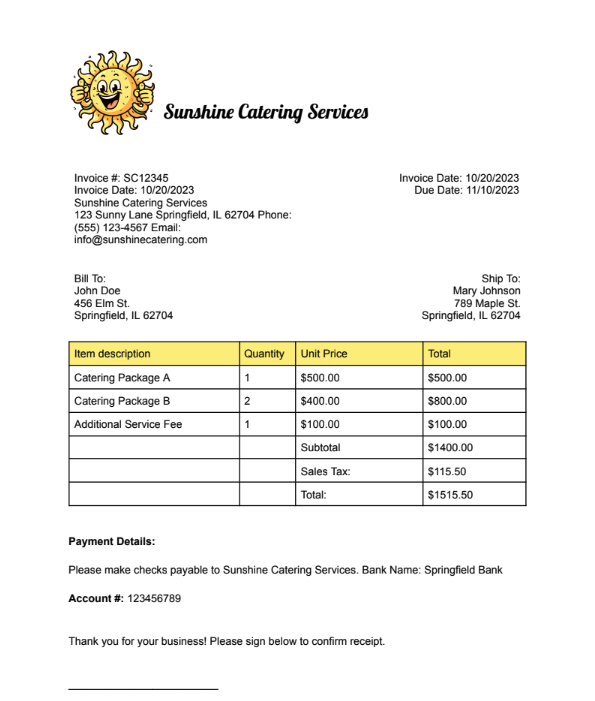
Here's a fill-in-the-blank structure you can copy for any invoice, regardless of industry.
- Header / business info: Your business name, logo, address, email, phone
- Bill-to details: Client name, company, address
- Invoice number & date: Unique reference, issue date
- Line items: Description, quantity, rate, amount (one row per item or service)
- Subtotal: Sum of all line items before tax
- Tax: Applicable tax amount (varies by country, see the comparison below)
- Total due: Subtotal plus tax, in bold or larger font
- Payment terms & due date: Due on receipt, Net 15, Net 30, or custom terms
- Payment methods accepted: Bank transfer, card, PayPal, etc.
- Notes / signature line: Personalised message and, if you want acknowledgement of terms, a signature field
This structure works whether you're building the invoice in a document editor, a spreadsheet, or a dedicated tool like Papersign.
Do Invoice Requirements Differ by Country?
Yes, and it catches a lot of freelancers and small business owners off guard the first time they invoice internationally. Tax rules, required fields, and thresholds vary significantly.
| Country | Mandatory fields | Threshold | Tax invoice distinction |
|---|---|---|---|
| Australia | 7 details for sales under $1,000 (seller ID, ABN, date, description, GST amount); buyer identity added above $1,000 | Tax invoice required for sales over AUD $82.50 if requested | GST-registered sellers must issue a "tax invoice," per the Australian Taxation Office |
| United Kingdom | VAT registration number shown, VAT charged separately, standard invoice details | Full VAT invoice generally expected for B2B sales, especially over £250 or on request | VAT-registered businesses must show VAT separately on every invoice, per GOV.UK |
| European Union | 15 mandatory fields harmonized across member states | Applies to VAT-registered businesses trading within the EU | Set by EU VAT Directive 2006/112/EC, Article 226; member states can't add extra requirements beyond it |
| United States | No federal format at all | Varies entirely by state | Sales tax invoicing is state-by-state; there's no equivalent federal "tax invoice" concept, per the IRS |
| Canada | GST/HST registration number once registered | Registration required once taxable supplies cross CAD $30,000 | Tiered field requirements apply above CAD $150, per the Canada Revenue Agency |
Worth flagging if you invoice into Europe: a wave of mandatory e-invoicing is rolling out through 2026 and 2027. Poland's KSeF system becomes mandatory in phases from February and April 2026, France requires e-invoicing for large and mid-sized firms from September 2026, and Germany requires businesses to be able to issue e-invoices from January 2027. If you regularly invoice clients in these markets, it's worth checking your invoicing tool supports the relevant format ahead of time.
How to Write an Invoice in 5 Steps Using Papersign
Once you know what goes on an invoice, turning it into a document you can send, track, and get acknowledged is straightforward in Papersign.
Step 1: Create a Papersign document
Create a free account at papersign.com. From the dashboard, click New Document and choose Create in Papersign, or upload an existing PDF invoice instead.
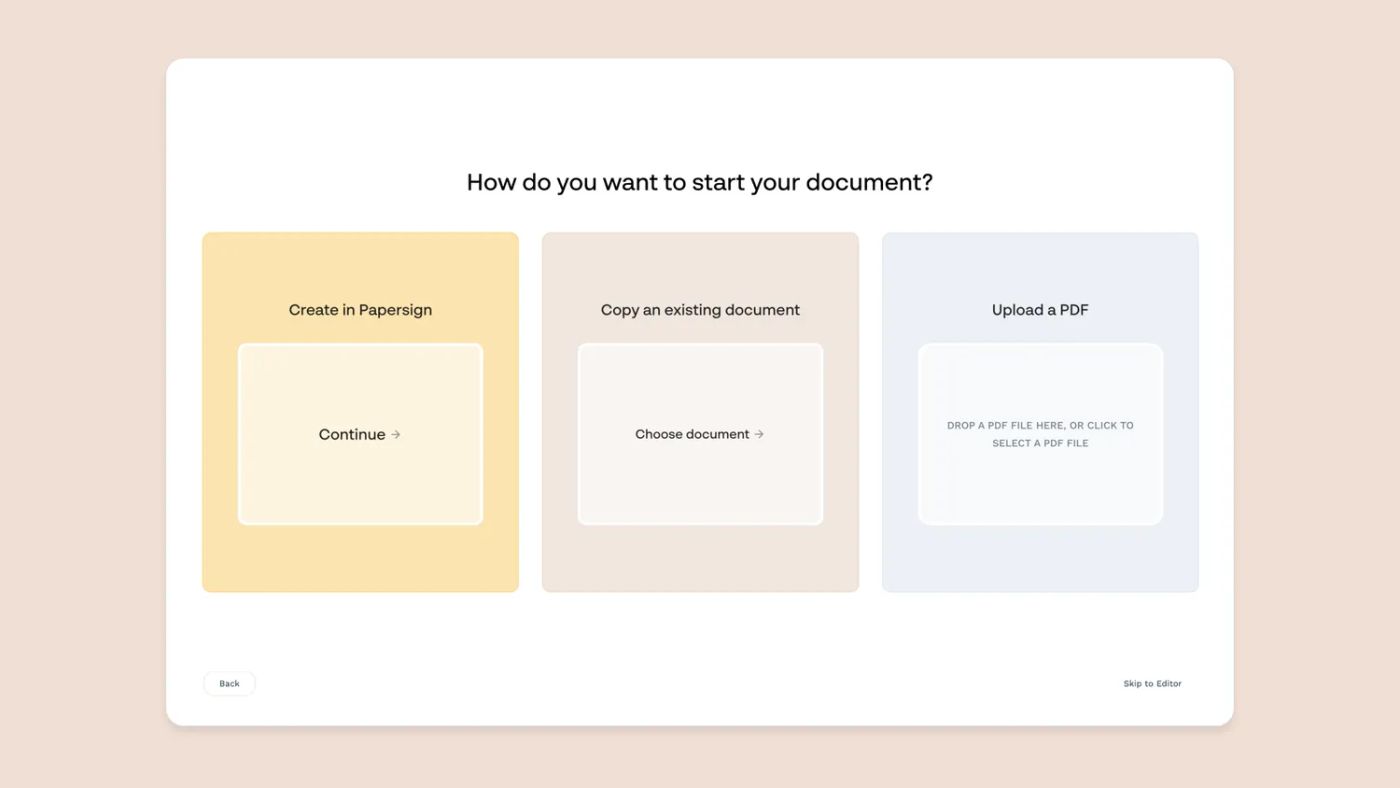
Don't want to start from scratch? Copy our free invoice template, fill in your details, export as a PDF, and upload it.
Step 2: Build the invoice content
Papersign's document editor works like Google Docs or Notion. Type to get started, then use slash commands or the contextual menu to add fields, tables, and content blocks for your line items and totals.
Step 3: Add your branding
Add your logo, brand colours, and font choices from the Theme menu. A branded invoice looks more professional and more legitimate to a client who's never worked with you before.
Step 4: Add a signable field
This is the step most invoices skip, and it's the one that meaningfully reduces payment disputes. Adding a signature field means your client formally acknowledges the invoice and its terms, instead of merely receiving it.
A signed invoice is a tangible commitment. It's harder to "forget about" or claim you never agreed to the amount owed once there's a signature, timestamp, and audit trail attached. This is one of the ways invoices left unpaid or ignored can be reduced before they become a real problem.
Step 5: Configure and send
Set an expiry date if you're running a time-limited rate, add a personalised message, and turn on automated reminders so a buried email doesn't cost you a payment. Then send it and track the status from your dashboard.
Free Invoice Templates by Type
Rather than build every invoice from a blank page, start from a template that matches your business:
- Service invoice template: a clean, general-purpose invoice for one-off client work.
- Freelance invoice template: built for project-based billing with clear scope and rate breakdowns.
- Recurring/subscription invoice: set up once for clients you bill on a regular cadence.
Check the template hub directly for the latest available formats, since new templates get added regularly. If you're invoicing a new client for the first time, it's also worth reviewing our guide on writing a contract for a new client and, for procurement-heavy work, how an RFI often precedes the first invoice in a vendor relationship.
5 Invoicing Best Practices to Get Paid on Time
1. Agree on payment types and terms upfront
Before you even send an invoice, confirm with your client which payment methods you accept (bank transfer, card, PayPal) and what your standard terms are. Fold this into your client onboarding process so it's never a surprise.
2. Include a personalised note
A quick line of genuine thanks turns your invoice from a pure transaction into a small relationship touchpoint. It costs nothing and takes ten seconds to add.
3. Keep track of specialised requests
Larger clients often want a PO number or specific currency on every invoice. Note it once, build it into a client-specific template, and you'll never miss it again.
4. Determine your invoicing cadence
Whether you invoice on project completion, monthly, or fortnightly, pick a consistent cadence and stick to it. Clients pay faster when they know what to expect and when.
5. Set a reminder to check in
If your terms are Net 15 or Net 30, set a calendar reminder about a week after sending to confirm receipt and answer any questions. Small nudges keep your invoice from getting buried.
FAQ
What must legally be included on an invoice?
At minimum: your business details, the client's details, a unique invoice number, the date, a description of goods or services, and the total amount due. Requirements expand from there depending on your country and whether you're registered for GST, VAT, or sales tax.
Can I write an invoice by hand?
Yes. A handwritten invoice is valid as long as it includes your contact details, the client's details, an invoice number and date, a description of the work, and the total amount owed.
What's the difference between an invoice and a receipt?
An invoice requests payment that hasn't happened yet. A receipt confirms payment that has already been made. They often contain similar details but serve opposite points in the transaction.
What is Net 30 and how does it work?
Net 30 means payment is due 30 days from the invoice's issue date. It's one of the most common payment terms for B2B invoicing and should always be stated explicitly, alongside the actual due date.
Do invoices need a signature to be valid?
No, a signature isn't legally required for most invoices to be valid. Adding one, though, gives you a documented acknowledgement from the client that reduces disputes over unpaid or "forgotten" invoices.
Do invoice requirements differ if I'm invoicing a client in another country?
Yes, significantly. Tax invoice rules, mandatory fields, and thresholds vary by country, and a growing number of markets (Poland, France, Germany) are moving toward mandatory e-invoicing formats through 2026 and 2027.
What's the difference between an invoice and a tax invoice?
A tax invoice is a specific type of invoice that includes tax registration details (like a GST or VAT number) required for tax-registered businesses. Not every invoice needs to be a tax invoice, but tax-registered sellers are usually required to issue one on request.
Suggested reading

Papersign (“Papersign” or “we”) provides the information, data, links and other materials on this page (collectively, “Information”) for informational and educational purposes only. We do not warrant or represent the accuracy, completeness, currency, or suitability of any Information for any use or purpose. Papersign is not a licensed legal provider nor is it providing any legal advice; the Information should not be so construed or used. Nothing contained in the Information is intended to create an attorney-client relationship, to replace the services of a licensed, trained attorney or legal professional, or to be a substitute for the legal advice of an attorney or trained legal professional licensed in your state/jurisdiction. Before taking any action, including using our services to execute contracts or other documents, You should always first consult an attorney licensed in your state/jurisdiction, in each instance, regarding the issues address by the Information. Please never disregard professional legal advice or delay in seeking it because of something you have read in the information.