
Papersign vs Adobe Acrobat Sign: Which Is Better in 2026?
Papersign and Adobe Acrobat Sign both produce legally binding e-signatures, but they sell very different things. Adobe bundles signing into an Acrobat PDF subscription sold annually per license, with the API and advanced workflows held back for the quote-only Acrobat Sign Solutions; Papersign is a standalone signing tool with unlimited documents for $24/user/month ($20 billed annually). Choose Adobe if you live in PDFs or need QES-grade compliance; choose Papersign if you just want documents signed.
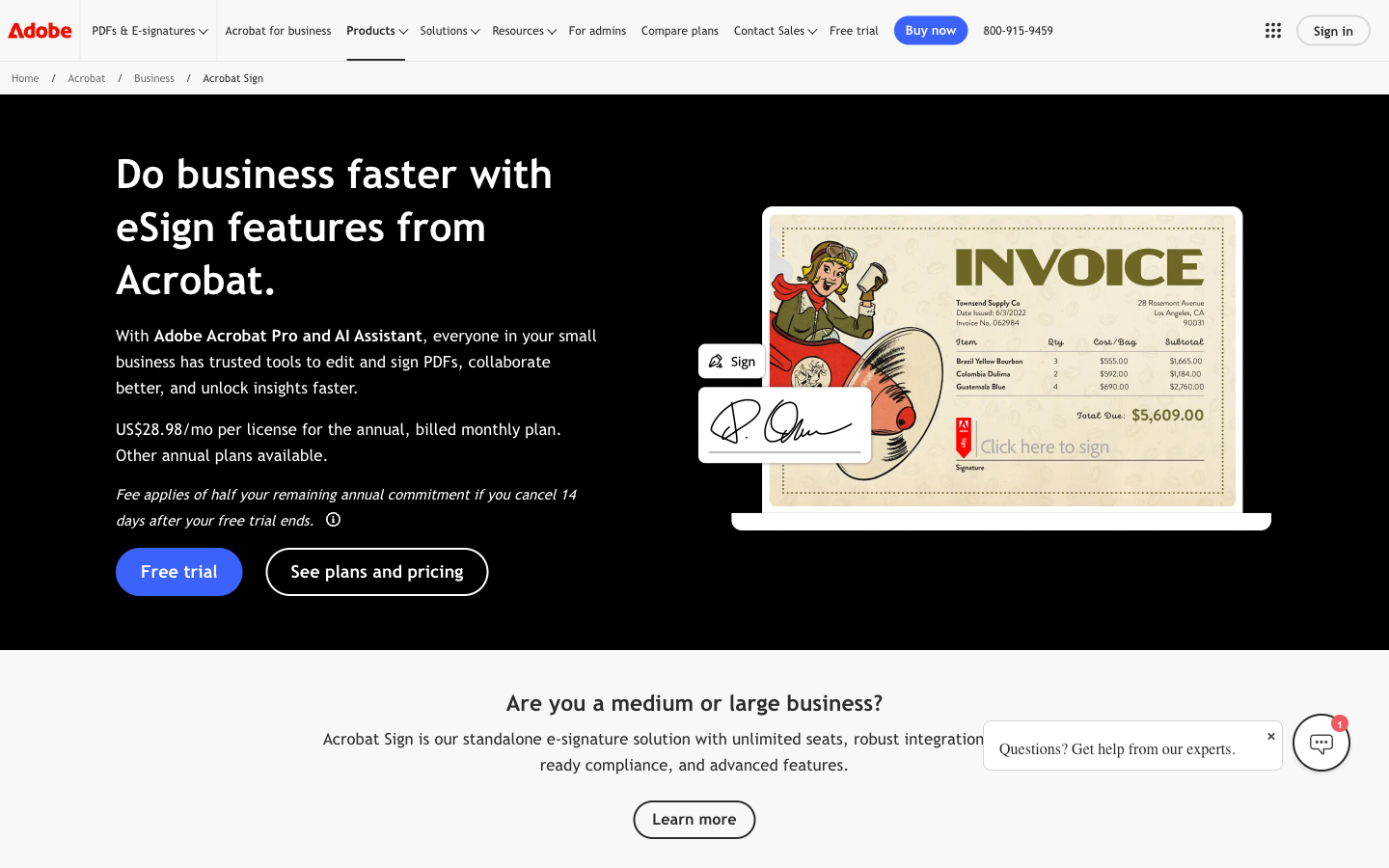
This comparison exists because a lot of people evaluating "Adobe Sign" are actually evaluating Acrobat. Adobe stopped selling its e-signature service as a small-business product years ago: today the self-serve way to get it is an Acrobat Standard or Pro subscription, where signing sits alongside a full PDF editor, and the dedicated product with the API and enterprise workflows (Acrobat Sign Solutions) is quote-only. Papersign takes the opposite bet. It was built by Paperform as a signing tool and nothing else: upload a PDF or write a document in its editor, send it, track it, done. So the real question here is whether you want to buy a PDF suite to get a signature button.
Quick verdict
Choose Papersign if…
- You want a tool where the entire interface exists to get documents signed
- You need the API without the 150-transactions-per-user cap on Acrobat Sign Solutions licenses
- You draft contracts and agreements from scratch rather than editing PDFs
- You want API access without a sales call (included on the self-serve Pro plan)
- You'd rather have nothing metered: no transaction caps, no overage negotiations
Choose Adobe Acrobat Sign if…
- Your organization already pays for Acrobat or Creative Cloud, so signing is effectively included
- You genuinely need Acrobat's PDF editing, conversion, and redaction alongside signing
- You need eIDAS Qualified Electronic Signatures, HIPAA with a BAA, or FedRAMP
- You run signing out of Salesforce, Workday, or SAP SuccessFactors at enterprise scale
Feature comparison
| Feature | Papersign | Adobe Acrobat Sign |
|---|---|---|
| Document Creation & Editing | ||
| Upload and sign PDFs | Yes | Yes |
| Rich editor to create documents from scratch | Yes | No |
| Full PDF editor | No | Yes |
| Signing Experience | ||
| Legally binding e-signatures | Yes | Yes |
| Real-time tracking and notifications | Yes | Yes |
| Automatic reminders | Yes | Yes |
| Manual signing links | Yes Pro | No |
| Unlimited users | Yes | No |
| Signing order / sequential routing | No | Yes |
| In-person signing | No | Yes |
| Bulk send | No | Yes Acrobat Pro |
| Mobile signing apps | No | Yes |
| Workflows & Automation | ||
| Paperform integration | Yes | No |
| Bulk sending | Yes Pro | No |
| Custom email notifications | Yes Pro | No |
| Webhooks | Yes Pro | Yes Acrobat Sign Solutions |
| Custom workflow designer | No | Yes Acrobat Sign Solutions |
| Web forms (self-serve signing links) | No | Yes Acrobat Pro |
| Power Automate integration | No | Yes |
| Security & Compliance | ||
| SOC 2 Type II | Yes | Yes |
| GDPR compliant | Yes | Yes |
| Activity trail | Yes | No |
| Signed document certificate | Yes | No |
| Consent agreement | Yes | No |
| Local data residency | Yes Enterprise | No |
| ISO 27001 | No | Yes |
| HIPAA-ready (BAA) | No | Yes Acrobat Sign Solutions |
| FedRAMP Tailored | No | Yes |
| Audit trail & completion certificate | No | Yes |
| Qualified Electronic Signatures (QES, eIDAS) | No | Yes Acrobat Sign Solutions |
| Identity Verification | ||
| Signer email verification | Yes Pro | Yes |
| SSO (SAML) | Yes Enterprise | No |
| SMS / phone OTP authentication | No | Yes Acrobat Sign Solutions |
| Knowledge-based authentication (KBA) | No | Yes Acrobat Sign Solutions |
| Government ID verification | No | Yes Acrobat Sign Solutions |
| Integrations & API | ||
| Papersign API | Yes Pro | No |
| Webhooks | Yes Pro | No |
| REST API | No | Yes Acrobat Sign Solutions |
| Salesforce integration | No | Yes Acrobat Sign Solutions |
| Microsoft 365 / Teams / Power Automate | No | Yes |
| Zapier | No | Yes |
| Workday / SAP SuccessFactors | No | Yes Acrobat Sign Solutions |
| Team & Branding | ||
| Team document organisation | Yes Pro | No |
| Email/chat support | Yes | No |
| Dedicated CSM | Yes Enterprise | No |
| SLA | Yes Enterprise | No |
| Custom branding | No | Yes Acrobat Pro |
| Admin console & user management | No | Yes Teams |
| Unlimited users | No | No |
| SSO (SAML) | No | Yes Acrobat Sign Solutions |
| 24/7 support | No | Yes Acrobat Pro for Teams |
| Templates | ||
| Reusable templates | No | Yes |
| Template library / form field templates | No | Yes |
Strengths of Adobe Acrobat Sign
The compliance stack is the deepest in the market, full stop. SOC 2 Type II, ISO 27001, FedRAMP Tailored, PCI DSS, HIPAA with a BAA, FDA 21 CFR Part 11 configurations, and eIDAS Qualified Electronic Signatures via certified EU Trust Service Providers. If your legal team has a checklist with QES or 21 CFR Part 11 on it, the shortlist is Adobe and maybe two other vendors. The catch is that nearly all of it lives on Acrobat Sign Solutions, the quote-only enterprise tier, not on the Acrobat plan you can actually buy with a credit card.
The PDF tooling is a real advantage too, if you need it. An Acrobat subscription gets you the industry-standard editor for modifying, converting, combining, and exporting PDFs, with signing attached. For teams whose documents arrive as PDFs from outside counsel or vendors, that bundle can be genuinely efficient. And the ecosystem reach is hard to match: native Microsoft 365 and Teams integration (including Live Sign for in-meeting signing), Power Automate, plus Salesforce, Workday, and SAP SuccessFactors connectors on enterprise plans. Twenty years of history (EchoSign launched in 2005, Adobe bought it in 2011) means procurement never blinks at the name.
Strengths of Papersign
Papersign's pricing is simple to reason about. Pro is $24 per user/month, or $20 per user/month billed annually, for unlimited signed documents. There is no transaction meter to watch: adding a seat costs the seat price and nothing else, with no envelope caps or overage fees behind it. The free plan (3 documents a month) includes the full editor, real-time tracking, an activity trail, and a signed document certificate, so a freelancer can run on it indefinitely.
The product itself is the other half of the argument. Because Papersign does one job, the flow from "I need this signed" to "it's sent" takes a couple of minutes with nothing to learn: upload a PDF and drop fields, or draft the agreement in a doc-style rich editor that Adobe has no equivalent for. API access and webhooks come with the self-serve Pro plan rather than an enterprise contract, and the Paperform integration turns form submissions into signed contracts automatically, which is useful for client onboarding and consent flows. Papersign launched in 2023, so it is a young product, but Paperform behind it has been bootstrapped and profitable since 2016.
Where Adobe Acrobat Sign falls short
The transaction cap sits on the product you'd buy for volume. Acrobat Standard and Pro for Teams are marketed as having no usage caps on e-signatures, but they are annual-only and have no API. Step up to Acrobat Sign Solutions, the product with the API and workflow tooling, and Adobe's terms include 150 signature transactions per user per year on user-licensed plans unless your contract says otherwise, about 12 sends a month. Go over and there's no overage button to click; you contact Adobe sales to negotiate pooled volume or a site license. A sales team sending 40 contracts a month per rep burns a year's allowance by mid-May, and it's the detail that most often sends buyers looking elsewhere.
You're buying a PDF suite to get a signature feature. There is no standalone self-serve signing plan. If all you want is signatures, the $14.99–$23.99 per user per month covers a PDF editor you may never open. The sending experience reflects that priority: requesting signatures is a feature tucked inside Acrobat's dense interface, with workflows spread across Acrobat, Document Cloud, and the Adobe account portal. One TrustRadius reviewer put it bluntly: "Things are disjointed and spread out. Logging in... takes you to a screen where you can buy more things." Meanwhile the capable version of the product, with the REST API, webhooks, custom workflows, and advanced signer verification, only exists behind an Acrobat Sign Solutions quote. Reviewers also report support below the enterprise tier routing through general Adobe channels; 24/7 support starts at Pro for Teams.
Where Papersign falls short
Papersign's integration catalog is short: the deep Paperform integration, the API, and webhooks. There is no native Salesforce package, no Teams app, no Workday connector. If your signing needs to live inside a CRM or HR system, Adobe's enterprise integrations are simply in a different class. Identity verification is thinner too: Papersign offers signer email verification, but not the knowledge-based authentication or government-ID checks Adobe sells on Solutions plans, and there is no QES option for regulated EU signatures. And while Papersign adds signature fields to uploaded PDFs, it won't edit the PDF's content; that remains Acrobat's home turf.
Pricing compared
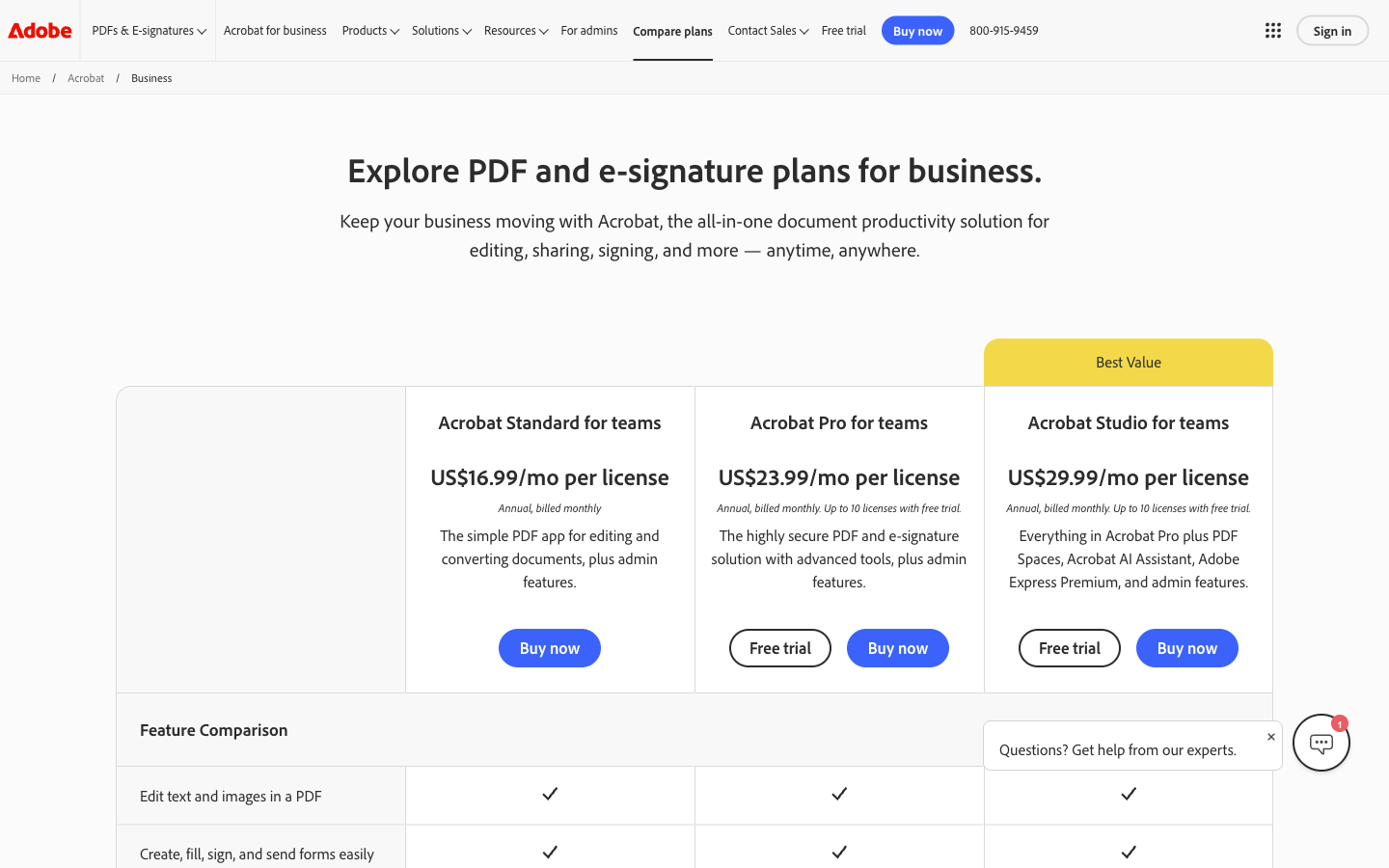
The pricing models barely overlap. Adobe charges per license for an Acrobat bundle: $14.99–$24.99 a month (billed annually) for individual Standard, Pro, and Studio plans, $16.99–$29.99 per license for team plans that are annual-only. API access isn't sold at any of those prices. Papersign also charges per user: $24/user/month, or $240/user/year, for unlimited documents and API access at 10 API-signed documents per seat per month, with a genuinely usable free tier below it. For a five-person team, that's roughly $1,439/year on Acrobat Pro for Teams versus $1,200/year on Papersign Pro, with no cap on sends or seats and the API included. Acrobat Standard for Teams comes in lower at about $1,019/year for five, but drops bulk send, branding, and payment collection.
Papersign
Adobe Acrobat Sign
| Product | Plan | Monthly Price | Annual Price (per month) | Free Plan | Free Trial | Limits |
|---|---|---|---|---|---|---|
| Papersign | Free | Free | Free | Yes | No | documents: 3, users: Unlimited |
| Papersign | Pro | $24/user | $20/user | documents: Unlimited*, users: Unlimited seats (each user billed), api requests: 10 documents per seat, per month | ||
| Adobe Acrobat Sign | Acrobat Standard (Individual) | 24.99 (month-to-month) | 14.99 (annual, paid monthly; $179.88/yr prepaid) | No | 7 days (individual Acrobat Pro); 14 days (teams, up to 10 licenses) | documents: Unlimited (no usage cap published for Acrobat e-signing), users: 1 |
| Adobe Acrobat Sign | Acrobat Pro (Individual) | 29.99 (month-to-month) | 19.99 (annual, paid monthly; $239.88/yr prepaid) | documents: Unlimited (no usage cap published for Acrobat e-signing), users: 1 | ||
| Adobe Acrobat Sign | Acrobat Studio (Individual) | 34.99 (month-to-month) | 24.99 (annual, paid monthly; $299.88/yr prepaid) | documents: Unlimited (no usage cap published for Acrobat e-signing), users: 1 | ||
| Adobe Acrobat Sign | Acrobat Standard for Teams | Not listed | 16.99 per license (annual only; $203.88/yr prepaid) | documents: Unlimited ("no usage caps in Acrobat for teams plans" per Adobe), users: Per license (1+); 2+ licenses qualify for a first-year discount | ||
| Adobe Acrobat Sign | Acrobat Pro for Teams | Not listed | 23.99 per license (annual only; $287.88/yr prepaid) | documents: Unlimited ("no usage caps in Acrobat for teams plans" per Adobe), users: Per license (1+); 2+ licenses qualify for a first-year discount | ||
| Adobe Acrobat Sign | Acrobat Studio for Teams | Not listed | 29.99 per license (annual only; $359.88/yr prepaid) | documents: Unlimited ("no usage caps in Acrobat for teams plans" per Adobe), users: Per license (1+) | ||
| Adobe Acrobat Sign | Acrobat Sign Solutions (Business/Enterprise) | Contact sales | Not listed | documents: 150 transactions per user per year on user-licensed plans unless the contract says otherwise (Acrobat Sign Additional Terms); pooled volume or a site license with unlimited users via sales |
What reviewers say
Adobe Acrobat Sign scores 4.6/5 on Capterra across 1,104 reviews, with reliability and the Acrobat integration earning most of the praise; the recurring complaints are pricing, the disjointed account experience, and support access. PandaDoc's (competitor-authored) review rates it 4.1/5 and flags it as a poor fit for small teams. Papersign is newer to the review platforms and doesn't yet have a comparable body of ratings, so weigh Adobe's score against a trial of both rather than reading it as a head-to-head verdict.
See it reviewed
Verdict: buy signing, or buy the suite?
Adobe Acrobat Sign is the right call in two situations. First, when your organization already runs on Acrobat or Creative Cloud: the signing capability is effectively free, and the Microsoft and Salesforce integrations reward staying inside the ecosystem. Second, when compliance requirements go beyond what most tools carry: QES through EU Trust Service Providers, HIPAA with a BAA, FedRAMP, or FDA 21 CFR Part 11 are Adobe's territory, priced and sold accordingly through Acrobat Sign Solutions.
Papersign is the right call when signing is the job. It undercuts Acrobat Pro for Teams per seat, has no transaction cap to trip over, includes API access on the plan you can buy with a credit card, and covers the compliance most businesses actually need (ESIGN/UETA, SOC 2 Type II, GDPR, full audit trail with a signed document certificate) on every plan including Free. If you've ever opened Acrobat just to send one contract and spent five minutes finding the button, that's the experience Papersign was built to replace.
Comparing more broadly? See our ranking of the best e-signature software for 2026, or if you're weighing Adobe against the other enterprise incumbent, the tools in our DocuSign alternatives guide cover that ground.
Frequently asked questions
Frequently Asked Questions
Do I need Acrobat Pro to send documents for signature?
Is there a transaction limit on Adobe Acrobat e-signatures?
Is the e-sign in Acrobat the same as Acrobat Sign Solutions?
Should I choose Adobe for PDF editing or Papersign for document creation?
When does Adobe Acrobat Sign genuinely beat Papersign?
How much does each cost for a 5-person team sending contracts?
Sources & References
- Adobe Acrobat Sign transaction limits — Adobe
- Adobe Acrobat business pricing plans — Adobe
- Adobe Sign Pricing 2026: Plans & Features Guide — Signeasy (competitor-authored)
- Adobe Acrobat Sign Review: Pricing, Ratings, Features — PandaDoc (competitor-authored)
- Adobe Acrobat Sign reviews — Capterra
- Papersign pricing — Papersign
Last updated October 7, 2026
Ready to try Papersign?
Send, sign, and manage documents in minutes — simple, fast e-signatures without the bloat.
Get Papersign FreeFree plan available, no credit card required